
How to Extract KakaoTalk Chats and Summarize with AI
Struggling to read through long KakaoTalk group chats? TalkCut lets you extract conversations from specific date ranges and have AI summarize the key points.
Preparation: Export Chat from KakaoTalk on PC
To use TalkCut, you first need to export your chat as a text file from KakaoTalk on PC. Follow these steps:
- Open a chat room in KakaoTalk on PC.
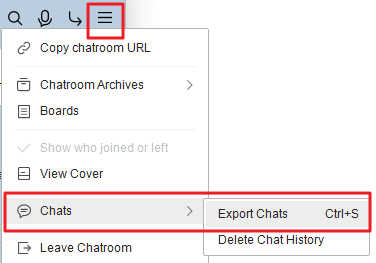
- Click the hamburger menu (≡) at the top right.
- Click Chats > Export Chats (Ctrl+S).
- Set a filename and download to your preferred location.
On KakaoTalk for Mac, use menu (≡) → Chat Room Settings → Manage Chat History → Save as Text File. Despite the button name, it saves a .csv file.
Upload the downloaded file to TalkCut.
Step 1: Upload File to TalkCut
Visit talkcut.kr, then drag and drop your .txt file (.csv on Mac) or click "Select File" to upload.
- Files are processed in your browser only — nothing is sent to any server.
- Chat content is analyzed automatically upon upload.
Step 2: Select Date Range, Speakers, and Detail Level
Once analysis is complete, you'll see the chat period, speaker list, and message count. Select your preferred options.
- Date Range — Extract only conversations from a specific date range.
- Speakers — Focus on specific people's messages.
- Detail Level — Choose the summarization style for AI.
- "Brief": Key points in 3-5 lines
- "Moderate": Organized by topic
- "Detailed": Full context and conversation flow
Step 3: Copy Prompt and Summarize with AI
Click "Extract" to generate an AI-ready prompt along with the chat text.
- Click the "Copy Prompt + Text" button.
- Open your preferred AI service (Gemini, ChatGPT, Claude, Perplexity, etc.) and paste.
- AI will analyze and summarize the conversation.
You can also edit the prompt freely to customize the output format.
Tips for Each AI Service
Gemini
Google Gemini excels at processing long texts. Especially useful when you have a lot of chat content, with high-quality Korean summarization.
ChatGPT
The most widely used AI service. Beyond summarization, you can ask follow-up questions like "List all decisions made in this conversation."
Claude
Excellent at processing long contexts and understanding nuances and context in conversations. Recommended for detailed summaries.
Perplexity
Searches for additional information about links and topics mentioned in the conversation. Useful when you need deeper research based on keywords in the chat.
FAQ
Is my chat data sent to external servers?
No. TalkCut processes everything in your browser, and chat files are never sent to any server. All data is cleared when you close the browser.
Which AI service should I use?
For large conversations, Gemini or Claude work best. For quick summaries, ChatGPT is great. If you want to research topics from the chat, try Perplexity.
Is TalkCut free?
TalkCut is completely free. However, AI services (ChatGPT, Claude, etc.) have their own pricing policies.
Which KakaoTalk exports are supported?
Verified with .txt exports from KakaoTalk for Windows and .csv exports from KakaoTalk for Mac. If your file isn't recognized, let us know via the contact email in the footer.
Get Started Now
With just a KakaoTalk chat file, you can get an AI summary in under a minute.
Use TalkCut